


Getting Started with the Swift SDK for Android
Learn how to set up the Swift SDK for Android and integrate Swift code into an Android app. This tutorial covers installation, creating a Swift library, and running Swift code on Android devices. By Darryl Bayliss.
Running the Hashing App
Open Android Studio and use it to open the hashing-app folder in the swift-android-examples repository. Once the project is open and completed setup, ensure the `hello-swift-java-hashing-app` is selected and a device or emulator is setup, then click the run button. It’s in the shape of a green play button. After a short time, the app will show.
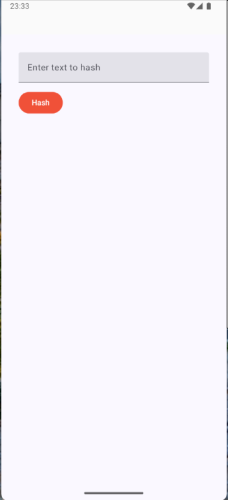
Type in the text of your choice, and tap the “hash”. The hashed equivalent of the string will appear.
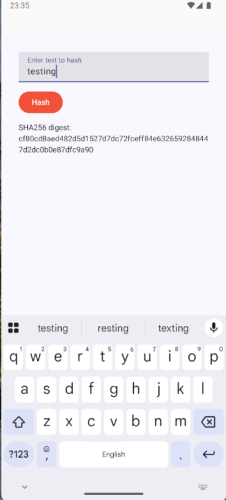
Congratulations, you’ve just ran Swift inside an Android app. That was worth all the effort!
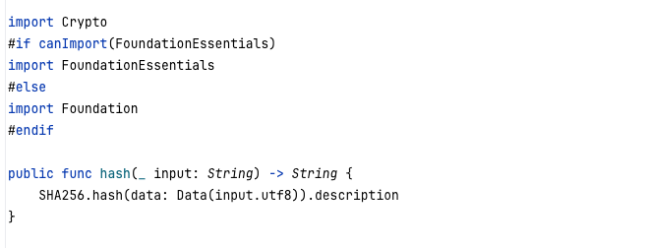
You might be wondering where the actual Swift code is that is running. You can check that by going into SwiftHashing.swift inside the `Sources` files inside the hashing-lib project.
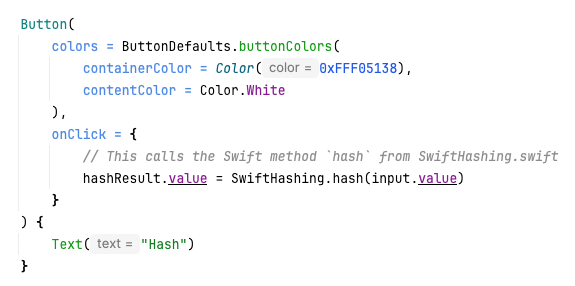
Then, once the Swift SDK for Android and swift-java converted the code into something Android can use, you can see it being called inside the MainActivity.kt inside the hashing-app project.
To finish off let’s do something interesting, adding a swift function to SwiftHashing.swift to run inside the Android app. Open SwiftHashing.swift and add the following function underneath the hash function.
public func developerGreeting(_ name: String) -> String {
    return "Hello, \(name)"
}
This is a simple method that takes a name as a parameter, and returns it to say hello to the developer.
Then in the app project inside MainActivity.kt, add the following code above the textfield:
Text(SwiftHashing.developerGreeting("Darryl"))
Feel free to add your own name or someone else if you prefer.
Next, go to the `.build` folder inside the hashing-lib project and delete. Be careful to check the folder has a . in the folder name.
Finally, build the app again. The app will build the library with the new function being called.
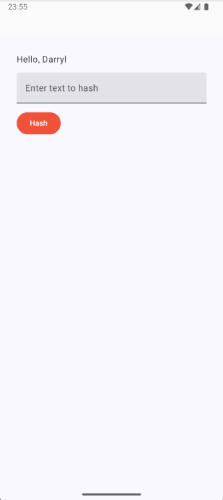
You’ve written a Swift function and compiled it to work in an Android app, well done!
Conclusion
In this tutorial you learned about the Swift SDK for Android and the benefits it brings to allowing reuse of your Swift code in Android Apps.
You learnt about the different components that make up the Swift SDK, and also how to set it up to build and create a simple Swift Library that can be called from a simple Android App.
The Swift SDK for Android is in preview and so has plenty of updates available in the future. To keep an eye on what is in the future, you can check out the following links:
– The Android category at Swift.org
– The vision document which shows the roadmap for the Swift SDK for Android
– The Android project board which shows immediate priority for the Swift Android working group.
Look out for a module on this topic which goes deeper into what the Swift SDK for Android can do for your needs. Available soon!